811 lines
23 KiB
Markdown
811 lines
23 KiB
Markdown
---
|
||
title: 我做了一个手写春联小网页,祝大家虎年暴富
|
||
date: 2022-01-28 14:59:51
|
||
permalink: /pages/829589/
|
||
titleTag: 原创
|
||
sidebar: auto
|
||
categories:
|
||
- 随笔
|
||
tags:
|
||
- null
|
||
author:
|
||
name: xugaoyi
|
||
link: https://github.com/xugaoyi
|
||
---
|
||
|
||
|
||
手写春联:<https://cl.xugaoyi.com/>
|
||
|
||
### 前言
|
||
虎年春节快到了,首先祝大家新年快乐,轻松暴富。
|
||
最近在网上经常看到生成春联的文章,不过这些小demo要么功能简陋,要么UI特别‘程序员’,满足不了我挑剔的眼光。干脆我自己做一个吧,顺便简单体验一下vite+vue3。(因为页面相对简单,vue组件风格还是使用选项式api,重点还是想把产品快速做出来。)
|
||
|
||
<!-- more -->
|
||
|
||
|
||
<p align="center"><img src="https://img-blog.csdnimg.cn/img_convert/185c88180b87ac7277072280a0c144ce.png" width="500" style="cursor: zoom-in;"></p>
|
||
|
||
### 产品构思
|
||
包含`手写春节`和`生成春联`两大功能:
|
||
- **手写春联**
|
||
- 模拟用笔写字的字迹
|
||
- 选择画笔颜色
|
||
- 调整画笔大小
|
||
- 清空画布
|
||
- 撤回笔画
|
||
- 切换上、下联、横批、福字
|
||
- 随机切换对联提示
|
||
- 预览图片和下载
|
||
- 贴春联海报和下载
|
||
|
||
- **生成模式**
|
||
- 选择画笔颜色
|
||
- 挑选生成的对联
|
||
- 输入对联
|
||
- 随机切换对联
|
||
- 贴春联海报和下载
|
||
|
||
- **其他**
|
||
- 快速切换模式按钮
|
||
- 可控制的背景音乐
|
||
- 微信分享网页
|
||
|
||
### 设计
|
||
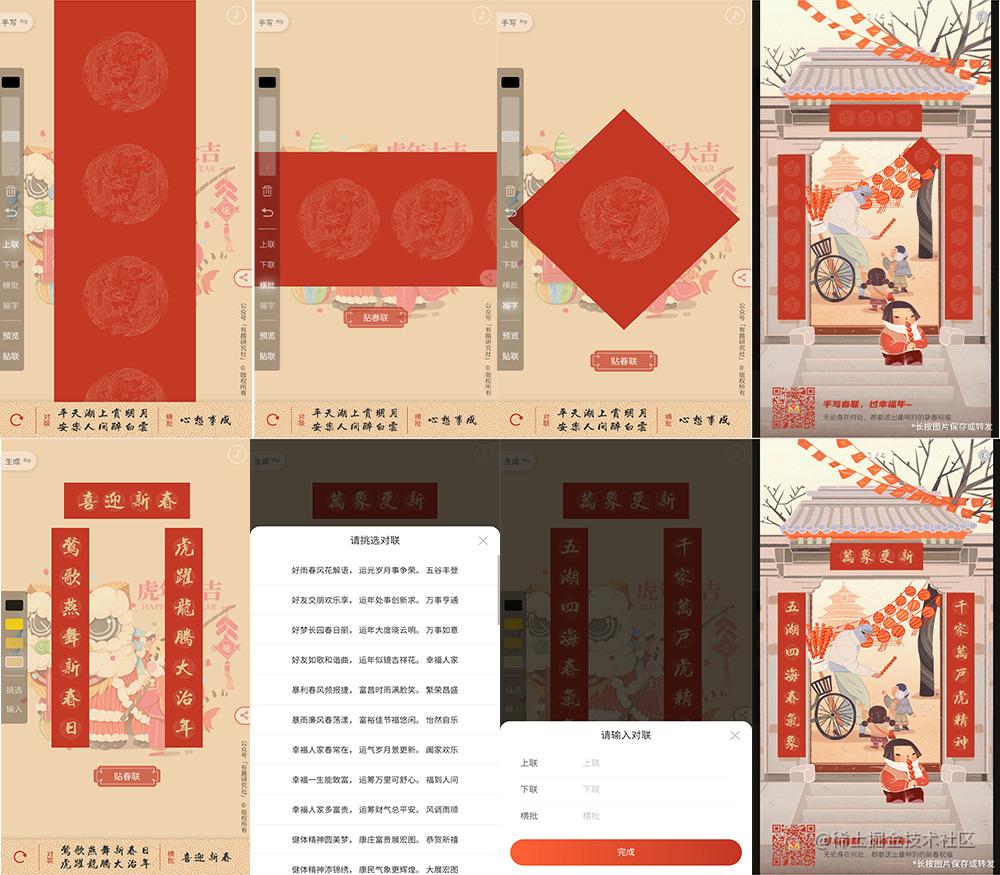
|
||
|
||
### 开发
|
||
- **技术栈**
|
||
- vite (打包&构建)
|
||
- vue3 (页面开发)
|
||
- vant(ui)
|
||
- sass (css)
|
||
- [smooth-signature.js (带笔锋手写库)](https://github.com/linjc/smooth-signature)
|
||
|
||
|
||
``` js
|
||
<template>
|
||
<div class="wrap" :class="'mode-' + mode" @touchstart="handleTouchstart">
|
||
<!-- 切换模式按钮 -->
|
||
<div class="toggle-mode-btn" @click="toggleMode">
|
||
{{ mode === 1 ? '手写' : '生成' }}
|
||
<i class="iconfont icon-qiehuan"></i>
|
||
</div>
|
||
|
||
<!-- 工具栏 -->
|
||
<div
|
||
class="actions"
|
||
:style="{ borderTopRightRadius: colorListVisibility ? '0' : '5px' }"
|
||
>
|
||
<!-- 手写模式显示 -->
|
||
<template v-if="mode === 1">
|
||
<!-- 调色板 -->
|
||
<div class="palette btn-block">
|
||
<div
|
||
class="cur-color"
|
||
@click="togglePalette"
|
||
:style="{ background: colorList[curColorIndex] }"
|
||
></div>
|
||
<ul class="colorList" v-show="colorListVisibility">
|
||
<li
|
||
v-for="(item, index) in colorList"
|
||
:key="item"
|
||
:style="{ background: item }"
|
||
@click="selectColor(index)"
|
||
></li>
|
||
</ul>
|
||
</div>
|
||
|
||
<!-- 滑块 -->
|
||
<div class="slider-box btn-block">
|
||
<van-slider
|
||
v-model="progress"
|
||
vertical
|
||
@change="changeProgress"
|
||
bar-height="28"
|
||
active-color="transparent"
|
||
:min="50"
|
||
:max="150"
|
||
>
|
||
<template #button>
|
||
<div class="custom-button"></div>
|
||
</template>
|
||
</van-slider>
|
||
</div>
|
||
|
||
<!-- 清空 -->
|
||
<div class="btn" @click="handleClear">
|
||
<i class="iconfont icon-lajitong"></i>
|
||
</div>
|
||
|
||
<!-- 撤销 -->
|
||
<div class="btn" @click="handleUndo">
|
||
<i class="iconfont icon-fanhui"></i>
|
||
</div>
|
||
|
||
<div class="line"></div>
|
||
|
||
<!-- 切换画布的按钮 -->
|
||
<div
|
||
class="btn"
|
||
:class="{ 'cur-active': curCanvasIndex === index }"
|
||
v-for="(item, index) in canvasList"
|
||
:key="item.name"
|
||
@click="changeCanvas(index)"
|
||
>
|
||
{{ item.name }}
|
||
</div>
|
||
|
||
<div class="line"></div>
|
||
|
||
<div class="btn prominent" @click="handlePreview">预览</div>
|
||
<div class="btn prominent" @click="openPosters">贴联</div>
|
||
</template>
|
||
|
||
<!-- 生成模式显示 -->
|
||
<template v-else>
|
||
<!-- 选颜色 -->
|
||
<div
|
||
class="color-list-quick"
|
||
:class="{ active: curColorIndex === index }"
|
||
v-for="(item, index) in colorList"
|
||
:key="item"
|
||
:style="{ background: item }"
|
||
@click="selectColor(index)"
|
||
></div>
|
||
<div class="line"></div>
|
||
<div class="btn" @click="showPickBox = true">挑选</div>
|
||
<div class="btn" @click="showInputBox = true">输入</div>
|
||
|
||
<!-- 挑选对联弹窗 -->
|
||
<van-action-sheet v-model:show="showPickBox" title="请挑选对联">
|
||
<ul class="duilian-list">
|
||
<li
|
||
v-for="(item, index) in duilianList"
|
||
:key="index"
|
||
@click="handlePickDuilian(item)"
|
||
>
|
||
<span>{{ item.shang }}</span
|
||
>, <span>{{ item.xia }}</span
|
||
>。
|
||
<span>{{ item.heng }}</span>
|
||
</li>
|
||
</ul>
|
||
</van-action-sheet>
|
||
|
||
<!-- 输入对联弹窗 -->
|
||
<van-action-sheet v-model:show="showInputBox" title="请输入对联">
|
||
<van-form @submit="handleSubmitInput">
|
||
<van-cell-group inset>
|
||
<van-field
|
||
v-model="shanglian"
|
||
name="shang"
|
||
label="上联"
|
||
placeholder="上联"
|
||
:rules="[
|
||
{
|
||
required: true,
|
||
message: '请输入7位汉字上联',
|
||
pattern: /^[\u4e00-\u9fa5]{7}$/
|
||
}
|
||
]"
|
||
clearable
|
||
/>
|
||
<van-field
|
||
v-model="xialian"
|
||
name="xia"
|
||
label="下联"
|
||
placeholder="下联"
|
||
:rules="[
|
||
{
|
||
required: true,
|
||
message: '请输入7位汉字下联',
|
||
pattern: /^[\u4e00-\u9fa5]{7}$/
|
||
}
|
||
]"
|
||
clearable
|
||
/>
|
||
<van-field
|
||
v-model="hengpi"
|
||
name="heng"
|
||
label="横批"
|
||
placeholder="横批"
|
||
:rules="[
|
||
{
|
||
required: true,
|
||
message: '请输入4位汉字横批',
|
||
pattern: /^[\u4e00-\u9fa5]{4}$/
|
||
}
|
||
]"
|
||
clearable
|
||
/>
|
||
</van-cell-group>
|
||
<div style="margin: 16px">
|
||
<van-button
|
||
round
|
||
block
|
||
type="primary"
|
||
native-type="submit"
|
||
color="linear-gradient(to right, #ff6034, #c33825)"
|
||
>
|
||
完成
|
||
</van-button>
|
||
</div>
|
||
</van-form>
|
||
</van-action-sheet>
|
||
</template>
|
||
</div>
|
||
|
||
<!-- 模式1-春联画布 -->
|
||
<div
|
||
v-show="mode === 1"
|
||
v-for="(item, index) in canvasList"
|
||
:key="item.name"
|
||
>
|
||
<canvas
|
||
class="canvas"
|
||
:class="item.className"
|
||
v-show="curCanvasIndex === index"
|
||
:style="{
|
||
marginTop:
|
||
item.height < clientHeight
|
||
? `${(clientHeight - item.height) / 2}px`
|
||
: 0,
|
||
marginLeft:
|
||
item.width < clientWidth ? `${(clientWidth - item.width) / 2}px` : 0
|
||
}"
|
||
/>
|
||
</div>
|
||
|
||
<!-- 模式2-春联画布 -->
|
||
<div v-show="mode === 2" class="canvas-mode-2">
|
||
<div class="row">
|
||
<canvas id="canvas-top" :width="200 * scale" :height="60 * scale" />
|
||
</div>
|
||
<div class="row">
|
||
<canvas id="canvas-left" :width="60 * scale" :height="364 * scale" />
|
||
<canvas id="canvas-right" :width="60 * scale" :height="364 * scale" />
|
||
</div>
|
||
</div>
|
||
|
||
<!-- 贴春联按钮 -->
|
||
<Button class="btn-posters" @click="openPosters" />
|
||
|
||
<!-- footer-当前对联提示 -->
|
||
<footer v-if="duilian.shang">
|
||
<div class="refresh-btn" @click="handleRefresh(true)">
|
||
<i class="iconfont icon-shuaxin" :class="{ rotate: isRotate }"></i>
|
||
</div>
|
||
<dl class="duilian">
|
||
<dt>对联</dt>
|
||
<dd>
|
||
<div>{{ duilian.shang }}</div>
|
||
<div>{{ duilian.xia }}</div>
|
||
</dd>
|
||
</dl>
|
||
<dl>
|
||
<dt>横批</dt>
|
||
<dd>{{ duilian.heng }}</dd>
|
||
</dl>
|
||
</footer>
|
||
|
||
<!-- 分享按钮 -->
|
||
<div class="share-btn" v-if="isShowShareBtn" @click="isShowShareTip = true">
|
||
<i class="iconfont icon-fenxiang"></i>
|
||
</div>
|
||
<!-- 微信分享提示语 -->
|
||
<div
|
||
class="share-tip"
|
||
v-if="isShowShareTip"
|
||
@click="isShowShareTip = false"
|
||
>
|
||
点击右上角把这个工具分享给朋友
|
||
<div class="hand">👆</div>
|
||
</div>
|
||
|
||
<!-- 保存tip -->
|
||
<p v-if="isShowTip" class="download-tip">*长按图片保存或转发</p>
|
||
|
||
<!-- 版权 -->
|
||
<div class="copyright">公众号「有趣研究社」 ©版权所有</div>
|
||
|
||
<!-- 载入图片元素,用于快速贴图使用, 注意设置crossorigin="anonymous"解决跨域 -->
|
||
<div v-if="isReadImages">
|
||
<img
|
||
crossorigin="anonymous"
|
||
v-for="(item, index) in bgList"
|
||
:src="item"
|
||
:key="item"
|
||
class="hide-img"
|
||
:id="`bg-img-` + index"
|
||
/>
|
||
<img
|
||
crossorigin="anonymous"
|
||
class="hide-img"
|
||
id="qrcode"
|
||
src="https://cdn.jsdelivr.net/gh/xugaoyi/image_store2@master/img/qrcode.zul0pldsuao.png"
|
||
/>
|
||
</div>
|
||
|
||
<!-- 背景音乐 -->
|
||
<audio
|
||
src="https://cdn.jsdelivr.net/gh/xugaoyi/image_store2@master/cjxq.mp3"
|
||
id="bgm"
|
||
ref="bgm"
|
||
loop
|
||
/>
|
||
<div
|
||
class="play-btn"
|
||
:class="{ paused: !isPlay }"
|
||
ref="playBtn"
|
||
@click="handlePlay"
|
||
>
|
||
<i class="iconfont icon-yinle"></i>
|
||
</div>
|
||
</div>
|
||
|
||
<div class="body-bg-img"></div>
|
||
</template>
|
||
|
||
<script>
|
||
import { ImagePreview, Notify } from 'vant'
|
||
import { isWX, isMobile } from '@/utils'
|
||
import Button from '@/components/Button.vue'
|
||
import dl from '@/assets/img/yh/dl.jpeg'
|
||
import hp from '@/assets/img/yh/hp.jpeg'
|
||
import fz from '@/assets/img/yh/fz.png'
|
||
|
||
// 对联数据
|
||
import duilianList from '@/mock/duilian'
|
||
|
||
const PROPORTION = 0.37 // 图片缩小比例
|
||
const INSTANTIATE_NAME = 'signature' // 实例名称
|
||
const MIN_WIDTH = 3 // 画笔最小宽
|
||
const MAX_WIDTH = 12 // 画笔最大宽
|
||
|
||
// 海报背景图大小
|
||
const BG_WIDTH = 750
|
||
const BG_HEIGHT = 1448
|
||
|
||
// 贴图定位和大小
|
||
const POSITION = [
|
||
{ left: 57, top: 510, width: 90, height: 546 }, // 上联
|
||
{ left: 600, top: 510, width: 90, height: 546 }, // 下联
|
||
{ left: 225, top: 345, width: 300, height: 90 }, // 横幅
|
||
{ left: 460, top: 450, width: 130, height: 130 }, // 福字
|
||
]
|
||
|
||
export default {
|
||
name: "Home",
|
||
components: {
|
||
Button
|
||
},
|
||
data() {
|
||
return {
|
||
duilianList,
|
||
mode: Number(localStorage.getItem('mode')) || 1, // 1 手写,2 生成
|
||
curCanvasIndex: 0, // 显示哪个画布
|
||
progress: 100, // 画笔大小的刻度
|
||
clientWidth: document.documentElement.clientWidth,
|
||
clientHeight: document.documentElement.clientHeight,
|
||
canvasList: [
|
||
{
|
||
name: '上联',
|
||
className: 'canvas-a',
|
||
bgImage: dl,
|
||
width: 600 * PROPORTION,
|
||
height: 3640 * PROPORTION,
|
||
},
|
||
{
|
||
name: '下联',
|
||
className: 'canvas-b',
|
||
bgImage: dl,
|
||
width: 600 * PROPORTION,
|
||
height: 3640 * PROPORTION,
|
||
},
|
||
{
|
||
name: '横批',
|
||
className: 'canvas-c',
|
||
bgImage: hp,
|
||
width: 2000 * PROPORTION,
|
||
height: 600 * PROPORTION,
|
||
},
|
||
{
|
||
name: '福字',
|
||
className: 'canvas-d',
|
||
bgImage: fz,
|
||
width: 366,
|
||
height: 366,
|
||
}
|
||
],
|
||
colorList: ['#000000', '#ffd800', '#e8bd48', '#ddc08c',],
|
||
curColorIndex: 0,
|
||
colorListVisibility: false, // 画布颜色选择列表可见性
|
||
isShowTip: false, // 是否显示底部提示语
|
||
duilian: {}, // 当前对联文本对象
|
||
isRotate: false, // 刷新icon旋转
|
||
bgList: [
|
||
'https://cdn.jsdelivr.net/gh/xugaoyi/image_store@master/1.4j8qpdnq80i0.jpeg',
|
||
'https://cdn.jsdelivr.net/gh/xugaoyi/image_store@master/4.4460an8ag5o0.jpeg',
|
||
'https://cdn.jsdelivr.net/gh/xugaoyi/image_store@master/5.3axtl4xpvy00.jpeg',
|
||
'https://cdn.jsdelivr.net/gh/xugaoyi/image_store@master/6.2lnbphdqjaq0.jpeg',
|
||
],
|
||
isReadImages: false, // 延迟加载图片用
|
||
isShowShareBtn: false, // 是否显示分享按钮
|
||
isShowShareTip: false, // 是否显示分享提示语
|
||
isPlay: false, // 是否在播放
|
||
|
||
// 模式2
|
||
canvasTop: null, // 横批
|
||
canvasLeft: null, // 上联
|
||
canvasRight: null, // 下联
|
||
imgObj1: null, // 横批图片对象
|
||
imgObj2: null, // 上下联图片对象
|
||
scale: Math.max(window.devicePixelRatio || 1, 2), // 用于增加画布清晰度
|
||
showPickBox: false, // 挑选对联的弹框
|
||
showInputBox: false, // 输入对联的弹框
|
||
shanglian: '', // 输入的上联
|
||
xialian: '', // 输入的下联
|
||
hengpi: '', // 输入的横批
|
||
};
|
||
},
|
||
computed: {
|
||
// 模式1-当前画布实例
|
||
curCanvasInstantiate() {
|
||
return this[INSTANTIATE_NAME + this.curCanvasIndex]
|
||
}
|
||
},
|
||
created() {
|
||
// 微信浏览器显示分享按钮
|
||
this.isShowShareBtn = isWX()
|
||
},
|
||
mounted() {
|
||
if (!isMobile()) {
|
||
Notify({ type: 'warning', message: '请用移动端打开获得最佳体验', duration: 6000, });
|
||
}
|
||
|
||
this.initMode1();
|
||
|
||
// 初始化对联提示
|
||
this.handleRefresh();
|
||
|
||
this.initMode2();
|
||
|
||
// 按钮添加激活时发光效果class
|
||
const btnEl = document.querySelectorAll('.btn,.btn-block');
|
||
btnEl.forEach((item) => {
|
||
item.addEventListener('touchstart', () => {
|
||
item.classList.add('btn-active')
|
||
})
|
||
item.addEventListener('touchend', () => {
|
||
setTimeout(() => {
|
||
item.classList.remove('btn-active')
|
||
}, 100)
|
||
})
|
||
})
|
||
|
||
// 延迟加载贴图背景
|
||
setTimeout(() => {
|
||
this.isReadImages = true
|
||
}, 1000)
|
||
},
|
||
|
||
watch: {
|
||
// 切换画笔颜色
|
||
curColorIndex() {
|
||
this.curCanvasInstantiate.color = this.colorList[this.curColorIndex]
|
||
if (this.mode === 2) {
|
||
this.refreshDuilian()
|
||
}
|
||
},
|
||
// 切换画布时应用当前画笔颜色和大小
|
||
curCanvasIndex() {
|
||
this.curCanvasInstantiate.color = this.colorList[this.curColorIndex]
|
||
this.handleChangeSize()
|
||
window.scrollTo(0, 0)
|
||
}
|
||
},
|
||
|
||
methods: {
|
||
initMode1() {
|
||
const { colorList, curColorIndex } = this
|
||
this.canvasList.forEach((item, index) => {
|
||
const options = {
|
||
width: item.width,
|
||
height: item.height,
|
||
minWidth: MIN_WIDTH, // 画笔最小宽度(px)
|
||
maxWidth: MAX_WIDTH, // 画笔最大宽度
|
||
minSpeed: 1.8, // 画笔达到最小宽度所需最小速度(px/ms),取值范围1.0-10.0
|
||
color: colorList[curColorIndex],
|
||
// 新增的配置
|
||
bgImage: item.bgImage,
|
||
};
|
||
|
||
this[INSTANTIATE_NAME + index] = new SmoothSignature(document.querySelector('.' + item.className), options);
|
||
})
|
||
},
|
||
|
||
initMode2() {
|
||
this.canvasTop = document.getElementById('canvas-top').getContext('2d')
|
||
this.canvasLeft = document.getElementById('canvas-left').getContext('2d')
|
||
this.canvasRight = document.getElementById('canvas-right').getContext('2d')
|
||
|
||
// 设字体样式
|
||
const font = "36px xs, cursive"
|
||
this.canvasTop.font = font
|
||
this.canvasLeft.font = font
|
||
this.canvasRight.font = font
|
||
|
||
// 增强清晰度
|
||
const { scale } = this
|
||
this.canvasTop.scale(scale, scale);
|
||
this.canvasLeft.scale(scale, scale);
|
||
this.canvasRight.scale(scale, scale);
|
||
|
||
// 设背景图
|
||
this.imgObj1 = new Image()
|
||
this.imgObj2 = new Image()
|
||
this.imgObj1.src = hp
|
||
this.imgObj2.src = dl
|
||
this.imgObj1.onload = () => {
|
||
// 贴背景
|
||
this.canvasTop.drawImage(this.imgObj1, 0, 0, 200, 60)
|
||
|
||
// 字体加载完成后
|
||
document.fonts.ready.then(() => {
|
||
this.handleTopFillText()
|
||
});
|
||
}
|
||
this.imgObj2.onload = () => {
|
||
// 贴背景
|
||
this.canvasLeft.drawImage(this.imgObj2, 0, 0, 60, 364)
|
||
this.canvasRight.drawImage(this.imgObj2, 0, 0, 60, 364)
|
||
|
||
// 字体加载完成后
|
||
document.fonts.ready.then(() => {
|
||
this.handleLRFillText(this.canvasLeft, this.duilian.shang)
|
||
this.handleLRFillText(this.canvasRight, this.duilian.xia)
|
||
});
|
||
}
|
||
},
|
||
|
||
// 模式2-刷新对联
|
||
refreshDuilian() {
|
||
this.canvasTop.drawImage(this.imgObj1, 0, 0, 200, 60)
|
||
this.canvasLeft.drawImage(this.imgObj2, 0, 0, 60, 364)
|
||
this.canvasRight.drawImage(this.imgObj2, 0, 0, 60, 364)
|
||
this.handleTopFillText()
|
||
this.handleLRFillText(this.canvasLeft, this.duilian.shang)
|
||
this.handleLRFillText(this.canvasRight, this.duilian.xia)
|
||
},
|
||
|
||
// 模式2-贴横批
|
||
handleTopFillText() {
|
||
// 贴文本
|
||
this.canvasTop.fillStyle = this.colorList[this.curColorIndex]
|
||
if (this.duilian.heng) {
|
||
this.duilian.heng.split('').forEach((item, index) => {
|
||
const left = 42 * (index + 1) - 22
|
||
this.canvasTop.fillText(item, left, 40)
|
||
})
|
||
}
|
||
},
|
||
|
||
// 模式2-贴上下联
|
||
handleLRFillText(ctx, text) {
|
||
ctx.fillStyle = this.colorList[this.curColorIndex]
|
||
if (text) {
|
||
text.split('').forEach((item, index) => {
|
||
const top = 50 * (index + 1) - 8
|
||
ctx.fillText(item, 13, top)
|
||
})
|
||
}
|
||
},
|
||
|
||
// 切换模式
|
||
toggleMode() {
|
||
if (this.mode === 1) {
|
||
this.mode = 2
|
||
this.refreshDuilian()
|
||
} else {
|
||
this.mode = 1
|
||
}
|
||
localStorage.setItem('mode', this.mode);
|
||
},
|
||
|
||
// 打开调色板
|
||
togglePalette() {
|
||
this.colorListVisibility = !this.colorListVisibility
|
||
},
|
||
|
||
// 关闭调色板
|
||
handleTouchstart(e) {
|
||
// 不是点击选择颜色时
|
||
if (e.path[1]?.classList?.value !== 'colorList' && e.target.classList?.value !== 'cur-color') {
|
||
this.colorListVisibility = false
|
||
}
|
||
},
|
||
|
||
// 选择颜色
|
||
selectColor(index) {
|
||
this.curColorIndex = index
|
||
this.colorListVisibility = false
|
||
},
|
||
|
||
// 切换画布
|
||
changeCanvas(index) {
|
||
this.curCanvasIndex = index
|
||
},
|
||
|
||
// 清空画布
|
||
handleClear() {
|
||
this.curCanvasInstantiate.clear();
|
||
},
|
||
|
||
// 撤销笔画
|
||
handleUndo() {
|
||
this.curCanvasInstantiate.undo();
|
||
},
|
||
|
||
// 预览
|
||
handlePreview() {
|
||
this.showTopTip();
|
||
this.isShowTip = true
|
||
const _this = this
|
||
ImagePreview({
|
||
images: this.getImageList(),
|
||
closeable: true,
|
||
startPosition: this.curCanvasIndex,
|
||
onClose() {
|
||
_this.isShowTip = false
|
||
},
|
||
});
|
||
},
|
||
|
||
// 打开海报预览
|
||
openPosters() {
|
||
// 创建画布
|
||
const canvas = document.createElement('canvas');
|
||
canvas.width = BG_WIDTH
|
||
canvas.height = BG_HEIGHT
|
||
const ctx = canvas.getContext('2d');
|
||
const resultImageList = [];
|
||
|
||
// 是否隐藏福字
|
||
const isHideFu = this[INSTANTIATE_NAME + 3].isEmpty()
|
||
this.bgList.forEach((item, index) => {
|
||
// 贴背景图
|
||
ctx.drawImage(document.getElementById('bg-img-' + index), 0, 0, BG_WIDTH, BG_HEIGHT)
|
||
|
||
// 贴对联
|
||
if (this.mode === 1) {
|
||
this.canvasList.forEach((item, index) => {
|
||
if (index === 3 && isHideFu) return;
|
||
const dlCanvas = document.querySelector('.' + item.className)
|
||
const { left, top, width, height } = POSITION[index]
|
||
ctx.drawImage(dlCanvas, left, top, width, height)
|
||
})
|
||
} else {
|
||
['canvas-left', 'canvas-right', 'canvas-top'].forEach((item, index) => {
|
||
const dlCanvas = document.getElementById(item)
|
||
const { left, top, width, height } = POSITION[index]
|
||
ctx.drawImage(dlCanvas, left, top, width, height)
|
||
})
|
||
}
|
||
|
||
// 贴二维码
|
||
ctx.drawImage(document.getElementById("qrcode"), 40, 1280, 580, 136)
|
||
|
||
// 贴文本
|
||
ctx.font = "18px sans-serif"
|
||
ctx.fillStyle = "#666666"
|
||
ctx.fillText('©公众号「有趣研究社」', 550, 1420)
|
||
|
||
// 导出图片
|
||
resultImageList.push(canvas.toDataURL('image/jpeg', 0.8))
|
||
})
|
||
|
||
// 打开图片预览
|
||
this.isShowTip = true
|
||
const _this = this
|
||
ImagePreview({
|
||
images: resultImageList,
|
||
closeable: true,
|
||
onClose() {
|
||
_this.isShowTip = false
|
||
},
|
||
});
|
||
this.showTopTip();
|
||
},
|
||
|
||
// 弹出顶部提示语
|
||
showTopTip() {
|
||
if (!sessionStorage.getItem('showTip')) {
|
||
sessionStorage.setItem('showTip', 'true');
|
||
Notify({
|
||
message: '长按图片可保存到本地',
|
||
color: '#c33825',
|
||
background: '#eed3ae',
|
||
});
|
||
}
|
||
},
|
||
|
||
// 获取对联图片列表
|
||
getImageList(type = 'image/png') {
|
||
const imageList = []
|
||
this.canvasList.forEach((item, index) => {
|
||
if (index === 3) {
|
||
// `福`字必须是png格式
|
||
type = 'image/png'
|
||
}
|
||
imageList.push(this[INSTANTIATE_NAME + index].toDataURL(type, 0.8))
|
||
})
|
||
return imageList
|
||
},
|
||
|
||
// 进度改变时
|
||
changeProgress(progress) {
|
||
this.progress = progress
|
||
this.handleChangeSize()
|
||
},
|
||
|
||
// 调整画笔大小
|
||
handleChangeSize() {
|
||
const { progress } = this
|
||
this.curCanvasInstantiate.minWidth = MIN_WIDTH * progress / 100
|
||
this.curCanvasInstantiate.maxWidth = MAX_WIDTH * progress / 100
|
||
},
|
||
|
||
// 刷新对联
|
||
handleRefresh(rotate) {
|
||
this.duilian = duilianList[Math.floor(Math.random() * duilianList.length)]
|
||
|
||
if (rotate) {
|
||
if (this.mode === 2) {
|
||
this.refreshDuilian()
|
||
}
|
||
// 使icon旋转
|
||
this.isRotate = true
|
||
setTimeout(() => {
|
||
this.isRotate = false
|
||
}, 300)
|
||
}
|
||
},
|
||
|
||
// 播放背景音乐
|
||
handlePlay() {
|
||
const { bgm } = this.$refs
|
||
if (bgm.paused) {
|
||
bgm.play()
|
||
this.isPlay = true
|
||
} else {
|
||
bgm.pause()
|
||
this.isPlay = false
|
||
}
|
||
},
|
||
|
||
// 完成输入对联
|
||
handleSubmitInput(values) {
|
||
this.duilian = values
|
||
this.showInputBox = false
|
||
this.refreshDuilian()
|
||
},
|
||
|
||
// 完成挑选对联
|
||
handlePickDuilian(item) {
|
||
this.duilian = item
|
||
this.showPickBox = false
|
||
this.refreshDuilian()
|
||
}
|
||
},
|
||
};
|
||
</script>
|
||
|
||
```
|
||
|
||
|
||
更多有趣的小网页欢迎关注公众号`有趣研究社`:
|
||
> [手写春联](https://cl.xugaoyi.com/)</br>
|
||
> [FC在线模拟器](https://game.xugaoyi.com/)</br>
|
||
> [爱国头像生成器](https://avatar.xugaoyi.com/)</br>
|
||
> [到账语音生成器](https://zfb.xugaoyi.com/)
|