4.7 KiB
| title | date | permalink | categories | tags | author | |||||||
|---|---|---|---|---|---|---|---|---|---|---|---|---|
| 使用Gitalk实现静态博客无后台评论系统 | 2019-12-25 14:27:01 | /pages/1da0bf9a988eafe5 |
|
|
|
使用Gitalk实现静态博客无后台评论系统
前言
Gitalk,一个基于 Github Issue 和 Preact 开发的评论插件。
下面我们来用它在vuepress搭建的博客中搭建评论区吧
准备
使用一个新的东西首先当然是要了解它
Gitalk demo:https://gitalk.github.io/
Gitalk github:https://github.com/gitalk/gitalk
实现
如何实现?最好的方法我认为是看官方文档,这里我只是记录一下实现的步骤。
使用一个别人已经开发好的 vuepress-plugin-comment 插件来帮助我们把Gitalk应用到vuepress搭建的静态博客。
安装
npm install --save vuepress-plugin-comment
使用
options的配置和Gitalk的配置相同
module.exports = {
  plugins: [
    [
      'vuepress-plugin-comment',
      {
        choosen: 'gitalk',
        options: {
          clientID: 'GitHub Application Client ID',
          clientSecret: 'GitHub Application Client Secret',
          repo: 'GitHub repo',
          owner: 'GitHub repo owner',
          admin: ['GitHub repo owner and collaborators, only these guys can initialize github issues'],
          distractionFreeMode: false
        }
      }
    ]
  ]
}
需要 GitHub Application,如果没有 点击这里申请,Authorization callback URL 填写当前使用插件页面的域名。
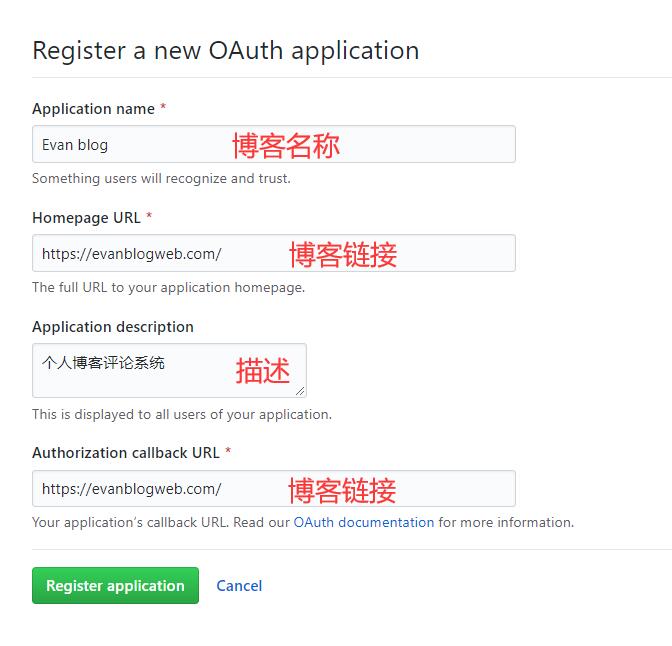
申请完成就会得 Client ID 和 Client Secret。然后把对应参数填写到配置中,例:
module.exports = {
  plugins: [
    [
      'vuepress-plugin-comment',
      {
        choosen: 'gitalk',
        options: {
          clientID: 'a6e*******4709b88b',
          clientSecret: 'f0e***************beb8b2d54d7241',
          repo: 'blog', // GitHub 仓库
          owner: 'xugaoyi', // GitHub仓库所有者
          admin: ['xugaoyi'], // 对仓库有写权限的人
          distractionFreeMode: false
        }
      }
    ]
  ]
}
配置好之后重启项目就发现页面上多了一个评论区,说明评论功能实现啦。但还是有一些bug,继续完善它~
BUG修复
评论区与博客样式不匹配
解决办法:新增全局样式文件.vuepress/styles/index.styl,写入样式
#vuepress-plugin-comment
  max-width $contentWidth
  margin 0 auto
  padding 2rem 2.5rem
  @media (max-width: $MQNarrow)
    padding 2rem
  @media (max-width: $MQMobileNarrow)
    padding 1.5rem
评论区出现 Error: Validation Failed.
问题分析:当页面 链接过长 或 存在中文链接,导致整个链接字符串长度超过50时,会造成请求issues接口失败,出现422状态码。(中文链接会自动转码,变得很长,id参数默认取的是链接,长度不能超过50)
解决办法:手动设置id取值,限制长度不超过50。
{
 choosen: 'gitalk',
 options: {
   ...
   id: "<%- (window.location.origin + (frontmatter.to.path || window.location.pathname)).slice(-50) %>", //  页面的唯一标识,长度不能超过50
   title: "「评论」<%- document.title %>", // GitHub issue 的标题
   labels: ["Gitalk", "Comment"], // GitHub issue 的标签
   body:"<%- document.title %>:<%- window.location.origin + (frontmatter.to.path || window.location.pathname) %>" // GitHub issue 的内容
 }
}
访问变量时,如
$frontmatter或window等,请使用 EJS 语法。因为在配置中不能使用回调函数,会被vuepress过滤,因此使用 EJS 语法。 ——插件作者文档说明
切换页面后评论区内容还是上一个页面的评论
解决:id在获取path时使用 frontmatter.to.path,插件内置了 ``frontmatter.from、frontmatter.to`。
{
 choosen: 'gitalk',
 options: {
   ...
   id: "<%- (window.location.origin + (frontmatter.to.path || window.location.pathname)).slice(-50) %>", //  页面的唯一标识,长度不能超过50
   title: "「评论」<%- document.title %>", // GitHub issue 的标题
   labels: ["Gitalk", "Comment"], // GitHub issue 的标签
   body:"<%- document.title %>:<%- window.location.origin + (frontmatter.to.path || window.location.pathname) %>" // GitHub issue 的内容
 }
}